RU
RU LV
LV
Register a Rental Agreement in the VID System

1. Log in to the EDS system
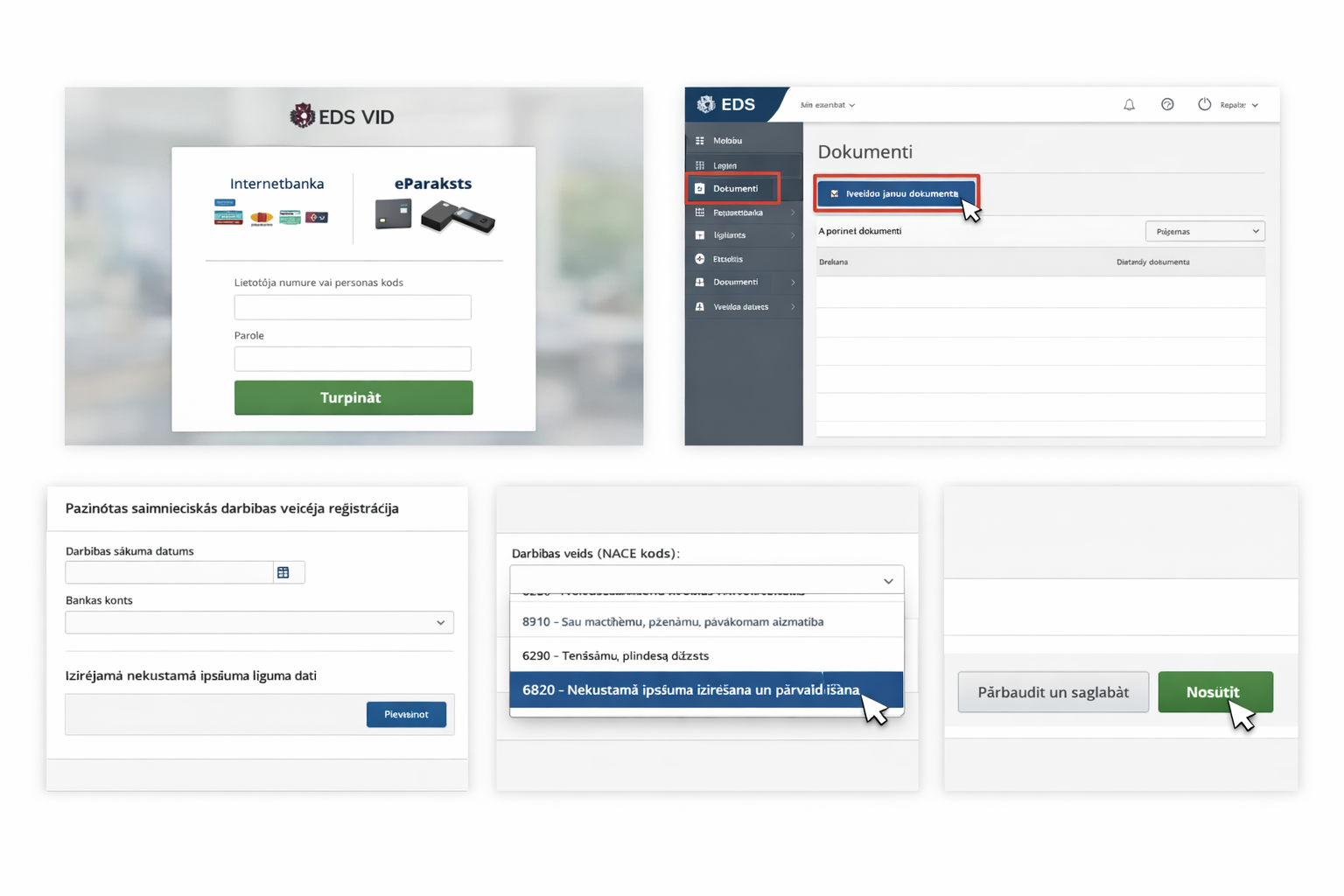
Go to the State Revenue Service Electronic Declaration System:
https://eds.vid.gov.lv/login/
Log in using your internet bank, eParaksts, or another available method.
After logging in, open the section “Dokumenti” and click “Izveidot jaunu dokumentu”.
2. Create a new document
In the document search field, type “fiziskas” and select the registration form for a natural person taxpayer.
Then choose the option:
“Paziņotas saimnieciskās darbības veicējs” and click “Reģistrēties”.
3. Enter business activity information
In the form you need to fill in several fields:
start date of the business activity — usually the date when the rental agreement was signed
bank account for payments
rental agreement information
In the contract section click “Pievienot”.
4. Specify the type of activity
In the contract object field select:
Nekustamais īpašums
Main activity type:
6820 – Sava vai nomāta nekustamā īpašuma izīrēšana un pārvaldīšana
After that, fill in all required fields.
5. Check and submit the document
Before submitting, click:
“Pārbaudīt un saglabāt”
If the system shows no errors, click “Iesniegt”.
After submitting the information, you will need to declare and pay taxes at the end of the year.